Firefox 3.6 was released yesterday, after over six months since the last major release, version 3.5. Firefox 3.6 ships with versions for over 70 languages, support for Personas, an add-on allowing you to change the appearance of the tab bar and choose from thousands of themes, improvements to the open video support (like the fullscreen mode), improved JavaScript performance and start-up time, support for the new DOM and HTML5 specs.
This is a short tutorial which will show how to install Firefox 3.6 in Ubuntu 9.10 Karmic Koala from the Mozilla Daily PPA.
First, open the terminal and add the necessary repository addresses to your /etc/apt/sources.list file:
sudo nano /etc/apt/sources.list
Or, for a GUI editor:
gksudo gedit /etc/apt/sources.list
Add the following two lines:
deb http://ppa.launchpad.net/ubuntu-mozilla-daily/ppa/ubuntu karmic main
deb-src http://ppa.launchpad.net/ubuntu-mozilla-daily/ppa/ubuntu karmic main
Notice that the second line is only needed if you plan to fetch the source code for Firefox. Make sure to save the file and proceed to the next step.
Now, add the trusted key for this repository:
sudo apt-key adv --keyserver keyserver.ubuntu.com --recv-keys 247510BE
Update your packages list:
sudo apt-get update
Remove the current Firefox installation:
sudo apt-get remove --purge firefox
And now install version 3.6:
sudo apt-get install firefox-3.6
Now you may want to create a new profile for the new 3.6 version. To do this, run Firefox with the -P parameter:
firefox -P
To run two different instances of Firefox and different profiles you can use:
firefox --no-remote -P
Showing posts with label karmic. Show all posts
Showing posts with label karmic. Show all posts
Friday, 22 January 2010

Saturday, 26 December 2009
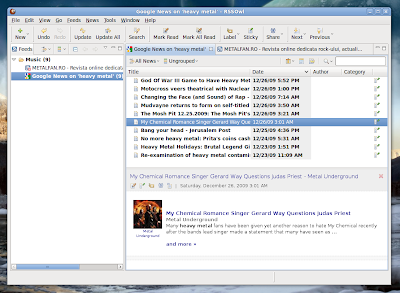
How-To: Install RSSOwl 2.0.1 in Ubuntu 9.10 Karmic
RSSOwl is a feature-rich RSS feed reader written in Java. To install the latest release in Ubuntu 9.10, follow the instructions below:
Edit your /etc/apt/sources.list:
sudo nano /etc/apt/sources.list
And add the following line:
deb http://packages.rssowl.org/ubuntu karmic main
Save the file (Ctrl+O), exit (Ctrl+X) and then add this repository's key to the trusted keys:
wget -q http://packages.rssowl.org/project/rene.moser.pubkey -O- | sudo apt-key add -
Update the packages list:
sudo apt-get update
And install RSSOwl:
sudo apt-get install rssowl
This is it. To remove RSSOwl from your Ubuntu box use:
sudo apt-get remove --purge rssowl
RSSOwl 2.0.1 running in Ubuntu

Edit your /etc/apt/sources.list:
sudo nano /etc/apt/sources.list
And add the following line:
deb http://packages.rssowl.org/ubuntu karmic main
Save the file (Ctrl+O), exit (Ctrl+X) and then add this repository's key to the trusted keys:
wget -q http://packages.rssowl.org/project/rene.moser.pubkey -O- | sudo apt-key add -
Update the packages list:
sudo apt-get update
And install RSSOwl:
sudo apt-get install rssowl
This is it. To remove RSSOwl from your Ubuntu box use:
sudo apt-get remove --purge rssowl
How-To: Install Flash Player 10.1 Beta 2 in Ubuntu 9.10 Karmic Koala
Adobe Flash Player 10.1 Beta 2 was released earlier this year, on December 17 at the Adobe MAX 2009. This release comes with several new features and numerous bug fixes.
To install Flash Player 10.1 Beta 2 in Ubuntu 9.10, just follow the steps below:
First, remove your existing Flash plugin. Do this depending on whether you installed Flash from the repositories or manually. If you installed Flash from the Ubuntu repositories, typing:
sudo apt-get remove --purge flashplugin-installer
should remove your current installation of Flash. If Flash was installed manually, the plugin should be located in the ~/.mozilla/plugins directory, where ~ is the home directory. So, to remove it:
rm -f ~/.mozilla/plugins/libflashplayer.so
Next, download the archive for the new Flash player from here (direct link here), or alternately you can type in a terminal:
wget http://download.macromedia.com/pub/labs/flashplayer10/flashplayer10_1_p2_linux_121709.tar.gz
Make sure the current working directory is the one where you saved the archive and uncompress it:
tar -xzf flashplayer10_1_p2_linux_121709.tar.gz
Next, create the ~/.mozilla/plugins directory (if it doesn't already exist):
mkdir -p ~/.mozilla/plugins
And copy the plugin inside it:
cp install_flash_player_10_linux/libflashplayer.so ~/.mozilla/plugins
Now restart Firefox and this should be all.
To install Flash Player 10.1 Beta 2 in Ubuntu 9.10, just follow the steps below:
First, remove your existing Flash plugin. Do this depending on whether you installed Flash from the repositories or manually. If you installed Flash from the Ubuntu repositories, typing:
sudo apt-get remove --purge flashplugin-installer
should remove your current installation of Flash. If Flash was installed manually, the plugin should be located in the ~/.mozilla/plugins directory, where ~ is the home directory. So, to remove it:
rm -f ~/.mozilla/plugins/libflashplayer.so
Next, download the archive for the new Flash player from here (direct link here), or alternately you can type in a terminal:
wget http://download.macromedia.com/pub/labs/flashplayer10/flashplayer10_1_p2_linux_121709.tar.gz
Make sure the current working directory is the one where you saved the archive and uncompress it:
tar -xzf flashplayer10_1_p2_linux_121709.tar.gz
Next, create the ~/.mozilla/plugins directory (if it doesn't already exist):
mkdir -p ~/.mozilla/plugins
And copy the plugin inside it:
cp install_flash_player_10_linux/libflashplayer.so ~/.mozilla/plugins
Now restart Firefox and this should be all.
Monday, 10 August 2009
Karmic Alpha 4 Planned for August 13

According to the latest issue of the Ubuntu Weekly Newsletter, the fourth alpha of Ubuntu 9.10 Karmic Koala is planned for release next Thursday, on August 13, 2009.
The Ubuntu team will use a so-called 'soft freeze' for the upcoming Karmic alpha release, which means only packages which do not stay in the way of the release will be uploaded, and focus on fixing the remaining critical bugs.
At the time of writing, Karmic has 80 bugs reported, from which over 30 are tagged to have a 'high' importance: 'Beyond that short list of bugs that are blockers for Alpha 4, there are those bugs that are listed as release-critical for karmic as a whole: https://bugs.launchpad.net/ubuntu/karmic/+bugs'
Sunday, 9 August 2009
An Early Look at Ubuntu 9.10 Karmic Koala - Overview & Screenshots
Ubuntu 9.10, codenamed Karmic Koala, is scheduled for release in late October, and it will be the 11th release of the most popular Linux distribution. Although it is scheduled to come with GNOME 2.28, it will be the first release to introduce the first changes that will be featured in GNOME 3.

In this article I'll overview the latest update of Karmic, after installing the Alpha 3 and performing a full sudo apt-get update && apt-get dist-upgrade. Currently, Karmic Koala comes with Linux kernel 2.6.31, GNOME 2.27.5 as desktop environment, Empathy as the default chat application, OpenOffice 3.1 as the office suite, GIMP 2.6.6 as image editor. Firefox 3.5 is not yet included in the Karmic repositories, but it will surely be available in the October release, so currently 3.0.13 is the version in the repositories.
Karmic Koala will come with Ubuntu One integration, which is a service that provides a free 2 GB disk space to Ubuntu users.

All you have to do is create a new account for Ubuntu One or use your already existing Launchpad.net account, then fire up Ubuntu One from the Applications -> Internet -> Ubuntu One menu entry, and start uploading your files. This service also includes a paid account which offers a 10 GB disk space.


Empathy is the new instant messaging application in Karmic, replacing Pidgin completely and introducing the Telepathy protocol. Empathy has a user interface based on Gossip, which is a chat client for GNOME on top of Jabber.
Empathy supports many IM protocols, including Yahoo!, Jabber or MSN. Besides those, support for internet relay chat (IRC) is also available, to say nothing about Google Talk voice calls. Empathy also comes with smileys, notifications, sounds, conversation logging and themes for the user list.

Ubuntu Karmic switched to ext4 as the default filesystem, but you can change to ext3 or some other filesystem using the partitioner included in the installer.
Another major change is the use of GRUB 2, the new boot manager.
Regarding development, Karmic will use the latest version of GCC 4.4 instead of 4.3.
Some other applications bundled with the Ubuntu CD include Transmission for BitTorrent, Evolution as the email client, over 10 GNOME games like Chess, Mahjongg, Four-in-a-Row or Sudoku, Totem for movies and videos, Rhythmbox as the music player, or the notes-taking application Tomboy.


One of the other changes with impact on the user interface is the GNOME display manager (gdm), which was rewritten completely for this release.
Ubuntu came a long way since the old days and it consolidates its position more and more with every new release. Karmic can be only a step ahead considering all the hard work that was put in GNOME and in key graphical applications like Firefox, GIMP or OpenOffice.
Ubuntu 9.10 Karmic Koala - default desktop

In this article I'll overview the latest update of Karmic, after installing the Alpha 3 and performing a full sudo apt-get update && apt-get dist-upgrade. Currently, Karmic Koala comes with Linux kernel 2.6.31, GNOME 2.27.5 as desktop environment, Empathy as the default chat application, OpenOffice 3.1 as the office suite, GIMP 2.6.6 as image editor. Firefox 3.5 is not yet included in the Karmic repositories, but it will surely be available in the October release, so currently 3.0.13 is the version in the repositories.
Karmic Koala will come with Ubuntu One integration, which is a service that provides a free 2 GB disk space to Ubuntu users.
Ubuntu One homepage

All you have to do is create a new account for Ubuntu One or use your already existing Launchpad.net account, then fire up Ubuntu One from the Applications -> Internet -> Ubuntu One menu entry, and start uploading your files. This service also includes a paid account which offers a 10 GB disk space.
Ubuntu One client


Empathy is the new instant messaging application in Karmic, replacing Pidgin completely and introducing the Telepathy protocol. Empathy has a user interface based on Gossip, which is a chat client for GNOME on top of Jabber.
Empathy supports many IM protocols, including Yahoo!, Jabber or MSN. Besides those, support for internet relay chat (IRC) is also available, to say nothing about Google Talk voice calls. Empathy also comes with smileys, notifications, sounds, conversation logging and themes for the user list.
Empathy running in Karmic

Ubuntu Karmic switched to ext4 as the default filesystem, but you can change to ext3 or some other filesystem using the partitioner included in the installer.
Another major change is the use of GRUB 2, the new boot manager.
Regarding development, Karmic will use the latest version of GCC 4.4 instead of 4.3.
Some other applications bundled with the Ubuntu CD include Transmission for BitTorrent, Evolution as the email client, over 10 GNOME games like Chess, Mahjongg, Four-in-a-Row or Sudoku, Totem for movies and videos, Rhythmbox as the music player, or the notes-taking application Tomboy.
GIMP 2.6.6

Tomboy 0.15.4

One of the other changes with impact on the user interface is the GNOME display manager (gdm), which was rewritten completely for this release.
Ubuntu came a long way since the old days and it consolidates its position more and more with every new release. Karmic can be only a step ahead considering all the hard work that was put in GNOME and in key graphical applications like Firefox, GIMP or OpenOffice.
Subscribe to:
Posts (Atom)